GDRNPP 6D Pose Estimation#
6D object pose estimation determines where an object is and how it is oriented in 3D space. The six degrees of freedom comprise three translation axes and three rotation axes, providing the spatial information that robots need for tasks such as object localization, grasping, and manipulation.
GDRNPP combines YOLOX object detection with GDRN pose estimation to recover the 3D rotation and translation of known objects from RGB images. This implementation uses the OpenVINO™ toolkit to accelerate the end-to-end pipeline on Intel CPUs and GPUs, with support for direct regression, PnP RANSAC, and optional depth-based pose refinement.
Image ──► YOLOX (detection) ──► GDRN (pose estimation)
                                       │
                    outputs: 6D Poses(rot6d + trans) + coor_xyz + mask
                                       │
                              ┌────────┴────────┐
                              ▼                 ▼
                      Direct Regression      coor_xyz + mask
                      (rot6d + trans)           │
                              │                 ▼
                              │            PnP RANSAC → rot6d + trans
                              └─────┐
                                    ▼
                              Optional: Depth Refine ──► Refined 6D Poses
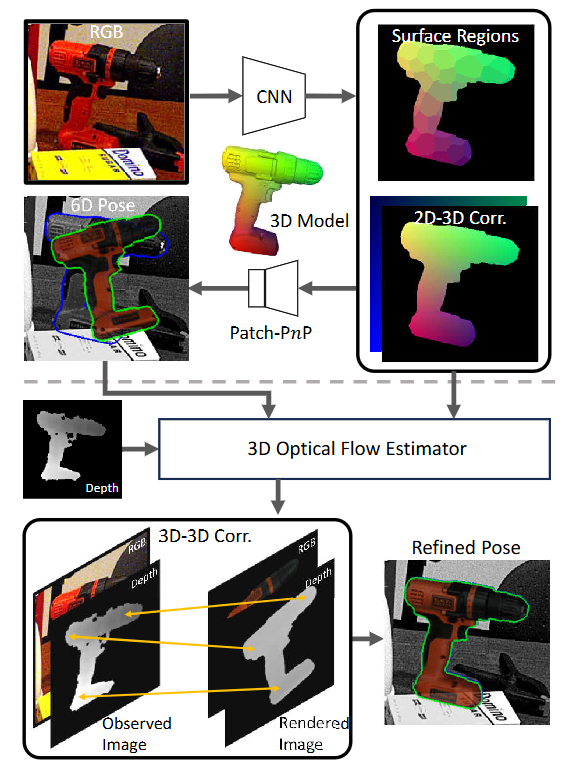
The pipeline supports:
OpenVINO™ inference for YOLOX and GDRN.
CPU,GPU, andAUTOdevice selection.YOLOX detections or pre-computed bounding boxes.
Direct-regression and PnP RANSAC pose estimation.
Optional depth-based translation refinement.
BOP-format predictions, evaluation, and per-stage profiling.
A lightweight deployment environment without PyTorch, torchvision, mmcv, or detectron2.
Prerequisites#
Complete the setup steps in Get Started. Docker is recommended for model conversion and evaluation.
Installation#
Get the GDRNPP pipeline source from the Robotics AI Suite repository. From the pipeline directory, initialize the pinned upstream submodule:
git submodule update --init gdrnpp
cd gdrnpp
Apply the OpenVINO™ integration patch:
git am ../patches/0001-Feat-Add-GDRNPP-OpenVINO-pipeline.patch
Development Environment#
Build and start the development container, then enter it:
bash docker_build_run.sh
docker exec -it gdrnpp_dev bash
The container includes OpenVINO™, PyTorch, Intel GPU drivers, Mesa, and the
model-conversion dependencies. Intel GPU access is passed through /dev/dri.
The setup also builds the CppEGLRenderer extension used by depth refinement.
Lightweight Deployment#
Model conversion requires the development environment. To deploy exported OpenVINO™ IR models in a smaller environment:
python3 -m venv .venv-deploy
source .venv-deploy/bin/activate
pip install -r requirements/requirements_deploy.txt
For depth refinement on Ubuntu 24.04, install the EGL build dependencies and compile the renderer:
sudo apt-get update
sudo apt-get install -y build-essential cmake python3-dev \
    libgl1-mesa-dev libegl1-mesa-dev
bash lib/egl_renderer/compile_cpp_egl_renderer.sh
The lightweight environment supports inference, YOLOX post-processing, and EGL
depth refinement. Use --save-only without the BOP scoring dependencies, or
run scoring in the development container.
Model Conversion#
Run the conversion commands from the GDRNPP repository root.
Export YOLOX#
python tools/openvino/export_yolox_openvino.py \
    --ckpt <path-to-yolox-checkpoint> \
    --output models/openvino/yolox \
    --convert-mode pytorch-ov \
    --fp16 \
    --verify
Export GDRN#
python tools/openvino/export_gdrn_openvino.py \
    --ckpt <path-to-gdrn-checkpoint> \
    --output models/openvino/gdrn \
    --convert-mode pytorch-ov \
    --fp16 \
    --verify
The GDRN model exports pred_rot, pred_t, coor_x, coor_y, coor_z,
and vis_mask outputs.
LM-O BOP Demo#
The LM-O demo uses published detections by default, so exporting YOLOX is optional.
Download the Model and Detections#
GDRN_DIR=output/gdrn/lmo_pbr/convnext_a6_AugCosyAAEGray_BG05_mlL1_DMask_amodalClipBox_classAware_lmo
DET_DIR=datasets/BOP_DATASETS/lmo/test/test_bboxes

mkdir -p "$GDRN_DIR" "$DET_DIR"

curl -fL --retry 3 \
    https://www.modelscope.cn/models/wangg12/GDRNPP/resolve/master/gdrn/lmo_pbr/convnext_a6_AugCosyAAEGray_BG05_mlL1_DMask_amodalClipBox_classAware_lmo/model_final_wo_optim.pth \
    -o "$GDRN_DIR/model_final_wo_optim.pth"

curl -fL --retry 3 \
    https://www.modelscope.cn/datasets/wangg12/GDRNPP_bop22_test_bboxes/resolve/master/datasets/BOP_DATASETS/lmo/test/test_bboxes/yolox_x_640_lmo_pbr_lmo_bop_test.json \
    -o "$DET_DIR/yolox_x_640_lmo_pbr_lmo_bop_test.json"
Download the LM-O base metadata, object models, and BOP19 test subset from the BOP dataset repository. The resulting layout must include:
datasets/BOP_DATASETS/lmo/
├── models/models_info.json
├── test/000002/rgb/
├── test/000002/scene_camera.json
├── test/test_bboxes/yolox_x_640_lmo_pbr_lmo_bop_test.json
└── test_targets_bop19.json
Export the LM-O Model#
python tools/openvino/export_gdrn_openvino.py \
    --ckpt "$GDRN_DIR/model_final_wo_optim.pth" \
    --output models/openvino/gdrn_lmo \
    --convert-mode pytorch-ov \
    --fp16 \
    --verify
Verify that OpenVINO™ detects the target device:
python -c "from openvino import Core; print(Core().available_devices)"
Use --device CPU if the output does not contain GPU.
Run with Published Detections#
BOP_PATH=datasets/BOP_DATASETS \
python tools/openvino/eval_bop_openvino.py \
    --gdrn-model models/openvino/gdrn_lmo/gdrn.xml \
    --det-file datasets/BOP_DATASETS/lmo/test/test_bboxes/yolox_x_640_lmo_pbr_lmo_bop_test.json \
    --dataset-dir datasets/BOP_DATASETS/lmo \
    --device GPU \
    --output eval_output/lmo_openvino \
    --profile \
    --save-only
The command writes BOP-format predictions, per-image timings, the evaluation
arguments, and a profiling report to eval_output/lmo_openvino. Remove
--save-only to run the bundled BOP scorer after inference.
Run the Complete YOLOX and GDRN Pipeline#
After exporting both models, replace --det-file with --yolox-model:
BOP_PATH=datasets/BOP_DATASETS \
python tools/openvino/eval_bop_openvino.py \
    --yolox-model models/openvino/yolox/yolox.xml \
    --gdrn-model models/openvino/gdrn_lmo/gdrn.xml \
    --dataset-dir datasets/BOP_DATASETS/lmo \
    --device GPU \
    --output eval_output/lmo_openvino_e2e \
    --save-only
Evaluation Options#
Argument |
Default |
Description |
|---|---|---|
|
Required |
Path to the GDRN OpenVINO™ |
|
|
Path to the YOLOX |
|
|
Pre-computed detection JSON; skips YOLOX |
|
|
Score threshold for pre-computed detections |
|
|
BOP dataset root |
|
|
Prediction and report directory |
|
|
OpenVINO™ device: |
|
Off |
Estimate pose with PnP RANSAC |
|
|
Visibility-mask threshold used by PnP |
|
Off |
Enable depth-based translation refinement |
|
|
Number of depth-refinement iterations |
|
|
Confidence threshold for depth refinement |
|
|
Comma-separated BOP error types |
|
Off |
Save predictions without BOP scoring |
|
Off |
Save per-stage timing information |
--use-pnp and --depth-refine are mutually exclusive.
Performance Notes#
GDRN uses fixed batch buckets and pads inputs to the nearest bucket to avoid GPU recompilation when the number of detections changes.
The first inference for each batch size compiles OpenCL kernels. The pipeline performs warmup during initialization.
Configure the OpenVINO™
CACHE_DIRproperty to persist compiled GPU kernels.FP16 compression reduces model size and is recommended for Intel GPU deployment.